Helpdesk SLA policies have been enhanced so timers can pause when a ticket is waiting on another party, instead of continuing to count against the SLA. This helps teams keep due times accurate when work depends on a user, vendor, or someone outside the agent’s control.
Key Updates:
Pause on Status:
On each priority row in SLA Targets, you can select the statuses that should pause the SLA for that priority. When a ticket moves into one of those statuses, the SLA stops counting.
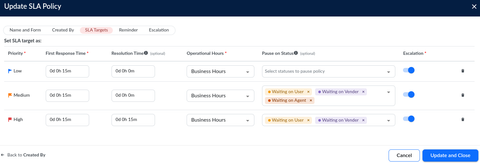
Custom Status Support:
In addition to waiting statuses, custom statuses can also be selected for pause, so policies can match your workspace’s real workflow.
Timer Behavior:
When a ticket moves into a selected status, first response and resolution timers stop. When it moves back to an active status, the timers continue and due times are extended by the paused time.
Reminder and Escalation Hold:
Reminder and escalation emails are held while a ticket is paused, and continue after the pause ends.
Ticket Visibility:
Paused tickets can show a Paused badge and can be filtered using SLA: Paused on the ticket list and kanban views.
.png)
Status Limit:
New, Open, In Progress, and Closed cannot be used to pause the SLA.
This enhancement gives teams more control over SLA timing and helps ensure compliance reflects actual working time, not time spent waiting on others.